SketchUp and Lumion Course Overview
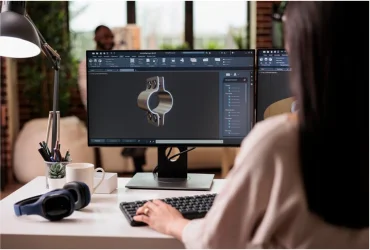
The SketchUp training and Lumion training course is designed to provide the participants with the theoretical knowledge and practical skills in using the powerful tools of the software. Starting from the fundamentals, the SketchUp classes will cover all aspects, including advanced modeling. Then the course moves on to importing SketchUp models into Lumion and giving them life by adding landscapes, lighting, and realistic materials.
Gain industry-relevant skills with hands-on training. Whether you are a construction professional, architect, interior designer, or a student, the Lumion Course will teach you all about modeling techniques, creation of architectural elements, architectural animations, and creation of realistic images.
10 + Years of Training Excellence
SketchUp and Lumion Course Syllabus
The syllabus of the SketchUp certification course includes the following:
Introduction
- Have an overview of the SketchUp interface and understand how to navigate it. Know its controls and navigation tools.
- Understand how to install the software and the system requirements for the installation.
- Learn about the features and applications of Lumion and have an overview of its applications in the architecture, engineering, and construction industry
- Know the basic concepts of 3D modeling and rendering.
Modeling With SketchUp
- Understand the drawing tools of SketchUp, including line, circle, arc, rectangle, and polygon.
- Find out how to use modification tools such as push, pull, move, rotate, offset, etc.
- Learn about the creation of 3D shapes, furniture, interior elements, and architectural elements like walls, windows, roofs, and floors.
- Study about the organization of models using layers and tags, and working with groups and components.
- Practical exercises.
Lumion Essentials
- Have an overview of Lumion libraries for materials, nature, objects, and effects.li>
- Learn how to import 3D models from SketchUp and other designing software.
Rendering With Lumion
- Know the importing of models from SketchUp and the rendering workflow.
- Find out how to apply and edit the material library and how to use the material library, such as glass, wood, water, etc.
- Learn about the addition of landscapes, trees, plants, etc., working with shadows, the addition of people, and the creation of realistic lighting.
- Understand the creation of water and terrain effects, camera settings, image rendering, scene composition, and high-quality photo outputs
- Practical training with real examples.
Presentation With SketchUp
- Understand the presentation tools in SketchUp and their usage.
- Learn about the use of styles to enhance appearance, the application of lighting for better visual presentation, and the setting of camera angles.
- Find out how to create walkthrough presentations, use section planes to create sectional views, and organize models with tags.
- Study the creation of layout drawings with SketchUp layout, addition of text and labels, and export of images and views.
- Hands-on training.
Animations With Lumion
- Know how to import and sync animations from SketchUp. Understand the creation of camera paths and walkthrough animations.
- Study the control of camera speed and movement. Learn how to animate objects and people.
- Find out how to add environmental effects like rain, clouds, and wind. Learn about the animation settings for day and night.
- Understand the creation of animations for various levels of construction and rendering animation videos.
- Practical training.
Advanced Modeling
- Learn about the creation of complex architectural structures and the use of advanced and solid tools.
- Understand the modeling of curved and organic surfaces and the creation of detailed architectural elements.
- Find out how to import CAD drawings and convert them into 3D models.
- Study the editing and optimization of imported models.
- Practical training.
Advanced Lumion Techniques
- Understand advanced material editing, rendering, and texture mapping in Lumion.
- Learn how to create advanced landscapes, terrain, shadow effects, photorealistic lighting, and object placement.
- Study advanced animation techniques and the usage of Lumion visual effects.
- Practical training.
The Importance of SketchUp and Lumion Course Certification in India
Professionals in construction, architecture, and interior design are expected to present their ideas and designs with precise models and realistic visualizations in India. SketchUp certification course helps professionals to master their modeling and visualization skills. The Lumion certification helps participants build a strong portfolio and increases their job opportunities, as it is proof of their skills.
Why Learn a SketchUp and Lumion Course?
The SketchUp and Lumion programs help the trainees to present their ideas and designs clearly and transform models into realistic images, animations, and walkthroughs. So, you are assured of better career opportunities. Your improved design presentation skills that you gain from SketchUp and Lumion program give you an edge over others in the competitive job market.
Industries Having High Demand for SketchUp and Lumion Software Training
SketchUp and Lumion software are used in the AEC (architecture, engineering, and construction) industries. In architecture, it is used to create models, renderings, and animations. The SketchUp software training is useful in the interior design industry to create room layouts. Lumion software training is useful in the construction industry to showcase building projects.
Who Can Attend SketchUp and Training Classes?
- The SketchUp learning course is for professional architects who want to upgrade their skills, and architecture students and graduates who are interested in creating precise models.
- It is suitable for civil engineers and other construction professionals who want to visualize their projects in 3D.
- It is also ideal for entrepreneurs and freelancers.
SketchUp and Lumion Certification Training Outcome
- After completing the SketchUp course, the participants will be able to create 3D models and apply materials and textures to the models.
- The Lumion training course will prepare the trainees to create realistic renders with proper lighting and environmental effects.
- At the end of the course, you will get an internationally recognized certificate.
Why Choose Infotech India for SketchUp and Lumion Course?
Infotech India is renowned for its short-term technical courses designed for professionals who wish to update their skills and upgrade their knowledge. You should choose it for the best SketchUp courses because of its:
- Comprehensive syllabus covering all aspects from fundamentals to advanced
- Experienced trainers with updated technical knowledge
- Flexible schedules, including weekend classes and online training to suit working professionals
- Hands-on training to provide practical skills
- Career support and placement guidance
Enroll now to create stunning models and visualizations and take your career to the next level.








 Frequency:
Monthly
Frequency:
Monthly