Navisworks Course Overview
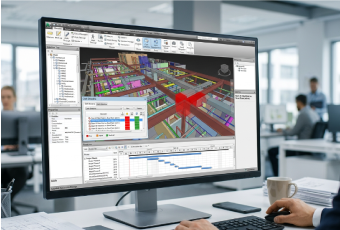
Navisworks software is a popular design review and project coordination software. The main aim of the course is to provide theoretical knowledge and practical skills in Autodesk Navisworks. The Navisworks training makes the trainees efficient in detecting and preventing costly errors before the actual construction begins. So, it is of great help to the construction industry in saving costs and completing projects on time by avoiding errors.
What will you learn?
- Navigation and review of 3D models
- Combining models from multiple disciplines
- Linking of project schedules and creation of viewpoints
- Performing clash detection and clash management precisely
- Applying the software in real projects
10 + Years of Training Excellence
Navisworks Training Syllabus
Autodesk Navisworks training course syllabus includes the following:
Introduction
- Have an overview of Navisworks, its applications, its role in construction, and its benefits.
- Become familiar with the main software applications of Navisworks, including Navisworks Manage, Navisworks Simulate, and Navisworks Freedom.
- Understand the workspace and interface of the software and the file formats supported by it, including NWC, NWD, and NWF.
- Learn how to import models from AutoCAD, Revit, etc.
Navigation of Models in Navisworks
- Understand the navigation bar and the various tools like Pan, Zoom, and Orbit.
- Learn about Steering Wheel Navigation tools, Markup tools, and Redlining tools. Study walk mode and fly mode navigation.
- Find out how to locate objects in a model, inspect model elements, change display settings, and use the selection tree.
- Know how to navigate using a keyboard and shortcuts. Study the hiding, isolating, and unhiding of elements.
- Practical exercises in navigation through a model and application of navigation tools.
Review of Models in Navisworks
- Have an overview of reviewing architectural, structural, and MEP models, and the importance of model review in modern BIM projects.
- Find out how to inspect model elements, use selection and search sets, review federated models, and identify objects.
- Learn about visibility control, model display management, and cross-section analysis.
- Discover the review of construction sequences and how to use review tools for quality assurance.
- Practical training in reviewing BIM models and generating review reports.
Clash Detection
- Understand the different types of clashes, including hard clash, soft clash, and workflow clash.
- Have an overview of Clash Detective in Navisworks and learn how to prepare models for clash detection.
- Find out how to combine and coordinate multi-disciplinary models and set up clash tests.
- Learn about the running of clash detection tests and the review and analysis of results. Study the creation of clash viewpoints.
- Practical classes in identifying clashes and classifying clash results.
4D Timeliner
- Have an overview of the 4D Timeliner tool and how to create tasks manually in Timeliner.
- Study how to import project schedules into Timeliner and manage construction sequences.
- Learn how to configure planned and actual progress, create construction simulations, and track project progress.
- Find out how to update and synchronize project schedules and identify scheduling conflicts and delays.
- Practical sessions in importing a project into Timeliner and linking model components.
5D Quantification
- Have an overview of Navisworks’ quantification tools and understand quantification workflows.
- Find out how to set up quantification workspaces and create quantification catalogs.
- Study how to quantify architectural, structural, and MEP components and create quantity worksheets.
- Learn the estimation of project costs using quantification data, quantity verification, and quantity validation.
- Practical sessions in setting up a quantification project and creating a quantification catalog.
Animation
- Have an overview of animation tools in Navisworks and understand its workspaces.
- Learn how to animate model components and use an animator for object movement. Study the management of animation timelines.
- Find out how to create transform animations, camera animations, and fly-through presentations. Know the basics of visual effects.
- Understand how to control speed, combine animations, integrate, review, and edit them. Study the techniques for presenting to clients.
- Practical exercises in creating animations and exporting them as video files.
Rendering and Visualization
- Have an overview of rendering and visualization, and Navisworks Rendering Capabilities.
- Become familiar with lighting and material effects, material libraries, and appearance profiles.
- Learn how to apply and manage materials, customize colors and textures, and work with transparency.
- Study the creation of a realistic visual presentation.
- Find out how to adjust the background and settings. Study lighting configuration and sun settings.
- Practical lessons in the application of materials and textures, customising appearance profiles, etc.
The Importance of Navisworks Certificate Course in India
The engineering, architecture, and construction sectors are blooming in India. So, the demand for professionals with expertise in Navisworks is high. The Navisworks certification course provides architects and engineers with the knowledge and skills essential for managing complex real projects. The Navisworks classes help avoid clashes and errors, saving time and money. Hence, the Navisworks training in India is important.
Why Learn a Navisworks Training Course?
Autodesk Navisworks software is of great help in project coordination, clash detection, 3D model integration, 4D simulation, animation, rendering, and visualization. You should learn the course to
- Attain knowledge in identifying conflicts and clashes between the MEP, structural, and architecture sectors.
- Acquire skills in linking 3D models.
- Master the software for combining multiple models into a single environment.
Industries Having High Demand for Autodesk Navisworks Software Course
The Industries Having High Demand for Autodesk Navisworks Software Course include construction for integrating models, infrastructure for large-scale projects, MEP for validating designs and avoiding clashes, oil & gas industry for complex piping, and architecture for reviewing designs and combining models.
Who Can Attend the Navisworks Training Program?
The Navisworks training program is for
- Civil and structural engineers for integrating models
- Designers and architects who want to improve their skills in reviewing layouts
- BIM professionals interested in developing 4D simulation
- Construction managers for better project execution
- Civil and mechanical engineering students, and architecture students who want to increase their practical skills
Navisworks Certification Training Outcome
- After completing the Navisworks training, you will gain practical skills in BIM coordination, reviewing models, clash detection, and project scheduling.
- On completion of the Navisworks course, learners will acquire knowledge in developing 4D simulations and creating animations.
- The course gives an edge over others in the competitive job market and improves the chances of employability.
Why Choose Infotech India for Navisworks Training Course
Infotech India is famous for its short-term technical courses designed to update the skills of working professionals. You should join it for Navisworks training because of the following:
- The comprehensive syllabus, including both practical and theoretical training
- Expert trainers with knowledge and experience in handling the software
- A globally recognized Navisworks certificate to prove the skills gained
- Flexible classes, including weekend classes and online sessions to suit working professionals and students
- Career support and placement guidance
Join India Infotech for the Navisworks course to become successful in the BIM and construction industry.








 Frequency:
Monthly
Frequency:
Monthly